Fairway Solitaire - Card Game
- 4.7
- Rating
- 5.00M
- Installs
- Free
- Price
 Analysis by App-foxy
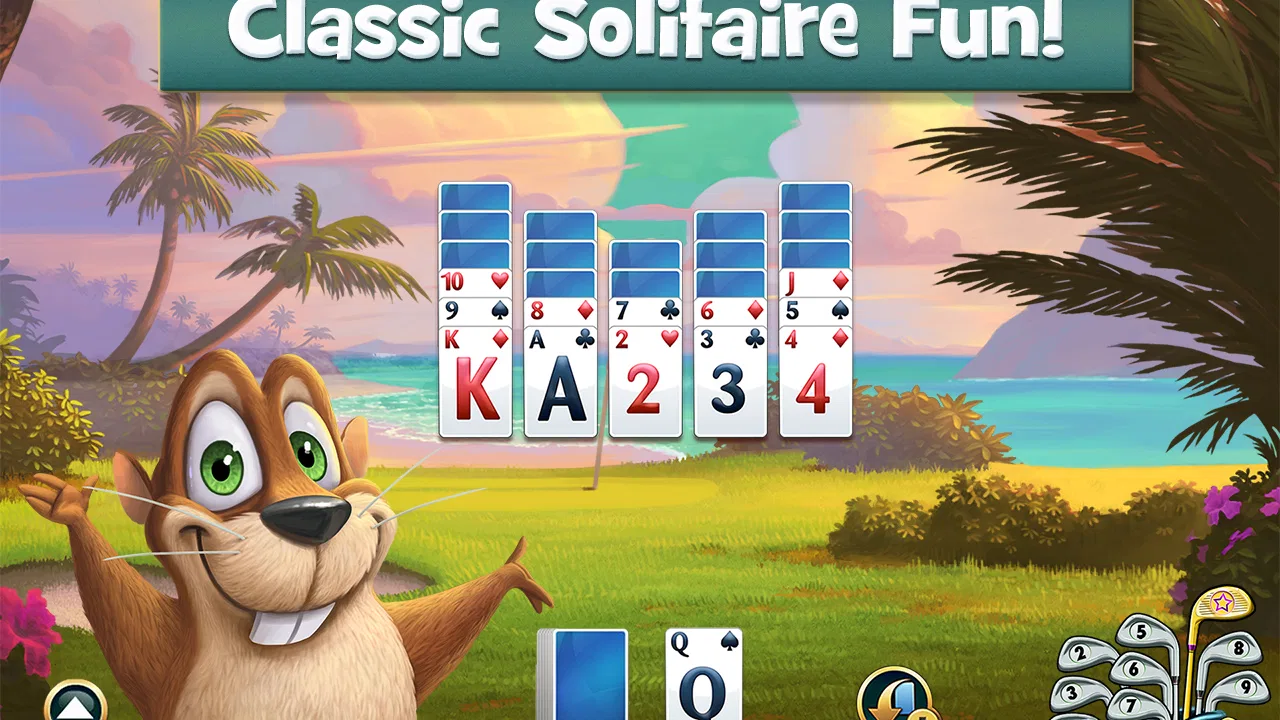
I picked up Fairway Solitaire expecting a light card game for short breaks, and that is still the best way to understand it. It combines solitaire-style play with a golf-course setting, so each completed deal feels like a small step through a scenic course rather than a plain card layout. I found the presentation more inviting than a standard solitaire app, while the familiar rules make it easy to start without learning a complicated system.
It is a free card game from BFG Entertainmnent Inc, rated for Everyone. The game has built a large audience, with more than five million installs and a 4.7 average from roughly 183 thousand ratings. Those figures suggest that its simple, repeatable format works for many players, but they do not remove the need to consider whether this particular style of solitaire suits you.
Getting started without the usual confusion
The first thing I would tell a new player is not to rush through the opening screens. The game is designed to be approachable, but solitaire apps often introduce several layers at once: the card layout, the course presentation, objectives, and optional purchases. Taking a moment to understand what the current deal is asking you to do makes the later rounds feel much less random.
You May Also Like

 Blood Strike: 2.5 Anniversary
Blood Strike’s Loadouts Turn Every Drop Into a Tactical Gamble
A close look at Blood Strike’s custom loadouts: how fast access to signature weapons reshapes its battle royale rhythm, rewards preparation, and narrows the gap between fights.

 Pandora - Music & Podcasts
Pandora’s Music Is Easy to Start, but Harder to Recover
Pandora’s strength is its low-effort path from a seed to a station. Its weak spot is how much confidence it asks you to place in connection, setup, and quiet recovery.

 8 Ball Pool
 Is Built on Rivalries, Rematches, and Routine
A close look at the rivalries, rematches, shared routines, and unanswered safety questions that turn a quick pool match into a persistent mobile community.

 Samsung Music
’s Quiet Strength Is Playing What You Already Own
Its reach comes less from spectacle than from dependable access to a personal library. That simplicity is both the app’s strongest retention engine and its ceiling.

 AccuWeather: Weather Radar
AccuWeather Review: A Quick, Clear Forecast for Everyday Decisions
For everyday plans, the best forecast is the one you can understand quickly. AccuWeather makes rain timing, radar, and local conditions easy to act on, with a few trade-offs.

 Hill Climb Racing
Why Hill Climb Racing Still Turns Crashes Into One More Run
A tiny car, a bumpy hill and one more upgrade: Hill Climb Racing keeps resurfacing because its simple chaos makes every near-miss feel personal.
More From Our News Desk



The core appeal is the decision-making between available cards. You are not simply turning cards over as quickly as possible; you are looking for a sensible sequence and trying to avoid leaving yourself with an awkward layout. That gives each hand a little tension. A good move can open several possibilities, while a careless choice can make the remaining cards harder to clear.
For a first session, I recommend playing slowly rather than treating the game like a reflex challenge. Scan the visible cards, identify the longest possible run, and only then commit to a move. This habit matters more here than fast tapping. It also helps you tell the difference between a genuinely difficult deal and a mistake caused by playing too quickly.
The scenic golf-course theme is more than a decorative change from a traditional solitaire table. It gives the game a sense of progression and makes short sessions feel connected. I liked having a visual destination for the cards, although players who want a purely minimalist card interface may find the setting busier than necessary.
Checks worth making before blaming the game
If the game does not behave as expected after installation, I would begin with ordinary checks rather than immediately assuming the app is broken. Confirm that the device is running at least Android 6.0, since that is the stated minimum operating system. On an older phone, compatibility is the first practical question to settle.
I would also close other demanding apps, restart the device, and make sure the game has finished installing before judging its performance. These are simple steps, but they can separate a temporary device problem from an issue inside the game itself. If the app opens normally but a particular screen feels slow, restarting once is a reasonable first test.
Another useful check is available storage. Even when a game itself is not especially demanding, a phone that is nearly full can behave unpredictably during installations and updates. Leaving some room for the operating system and other apps is sensible, especially if the game has not been updated recently on your device.
On iOS or Android, I would use the official store version rather than an unfamiliar copy. That keeps the installation path straightforward and makes it easier to identify the installed release. The current version is 1.56.5, so checking the version shown on the device can help when troubleshooting without guessing.
There is also a practical account question. If you play on more than one device, do not assume that progress will automatically appear everywhere. I would first play on one device, note how the game handles progress, and avoid clearing app data or reinstalling until I understood what would remain. That caution is especially important for a game built around gradual course progress.
How I recover when a session goes wrong
When a round feels lost, my first recovery step is to stop tapping and inspect the remaining layout. Solitaire encourages impulsive moves because every available card looks like an opportunity. In practice, the better recovery often comes from finding a less obvious sequence, preserving a useful card, or choosing a move that keeps more options open.
I also avoid spending anything just because a deal has become frustrating. The game is free to download and includes in-app purchases ranging from $0.99 to $119.99 per item. That broad range makes it important to treat purchases as optional convenience rather than part of the basic installation. I would only consider buying something after deciding that it genuinely improves my way of playing.
If a round freezes, closes, or returns you to an earlier screen, I would restart the game once and then repeat the same action carefully. If the problem only happens after a particular tap, remember what you did immediately beforehand. That detail is more useful than simply saying that the game “does not work,” especially if you later need help from the developer.
Before reinstalling, I would make sure I was comfortable with the possibility of losing local progress. A reinstall can solve corrupted local files, but it can also remove information stored only on the device. For that reason, reinstalling should be a later step, not the automatic answer to every loading problem.
The same caution applies to clearing storage or app data. Those options can be effective when an app repeatedly fails at startup, but they are more disruptive than closing and reopening it. I would reserve them for a persistent issue and only after checking whether my progress is connected to any supported recovery method.
Small habits that make the card play better
One of the most useful habits I developed was to treat the visible cards as a planning puzzle rather than a race. Before making a move, I look for cards that can extend the current run and consider whether using one now will expose something more valuable. This is a small change, but it makes the game feel more strategic and reduces the number of hands lost to careless choices.
I also use short sessions deliberately. A quick round fits well into a commute, a waiting room, or a few minutes before bed. If I keep playing after I stop paying attention, my decisions become automatic and the game feels more frustrating than relaxing. The scenic setting works best when I let the pace remain calm.
Another practical tip is to separate “I do not understand the objective” from “the deal is difficult.” If the board seems impossible, reread what the current round is asking you to accomplish and check whether you are pursuing the right sequence. This prevents wasted attempts caused by misunderstanding the goal rather than by the card arrangement itself.
I would not play every hand with the same strategy. Some layouts reward clearing a long run immediately, while others benefit from preserving a card that can connect separate groups later. Watching how the remaining cards change after each move teaches more than simply repeating the same opening pattern.
For someone who enjoys solitaire but tires of plain static tables, the golf-course framing gives a welcome sense of place. For someone who wants deep competitive play, precise statistics, or a completely distraction-free interface, a conventional solitaire app may be the better fit. The trade-off is clear: this game adds atmosphere and progression to a familiar format, but that atmosphere may be unnecessary for players who only want cards.
When the app is not really the problem
Not every disappointing session points to a technical fault. Solitaire naturally includes deals that feel restrictive, and the game’s course presentation can make a failed attempt feel more significant than it really is. If the app is responding normally and the cards are moving as expected, the issue may simply be the difficulty of the current hand or an overly aggressive choice earlier in the round.
Connection problems can also be mistaken for game problems when a screen takes longer to load or a purchase-related page does not respond. I would test another app or website on the same device before drawing a conclusion. If everything else is struggling, the network or device is a more likely starting point than the card game itself.
Purchases deserve their own judgment. The free entry point is a genuine advantage for casual players, but the presence of optional items means I would use the game’s purchase controls carefully, particularly on a shared device. Anyone looking for a completely purchase-free experience should be aware that the game is not designed around that expectation.
Age suitability is straightforward because the content rating is Everyone, but that does not mean every player will enjoy the same pace. Younger players may like the visual theme and simple rules, while adults who prefer a quiet puzzle may appreciate the low barrier to entry. At the same time, people seeking a more demanding card challenge may outgrow the basic format.
The developer is listed as BFG Entertainmnent Inc, and the game has been available since Aug 31, 2016. Its long presence and substantial player base make it feel like an established casual title rather than a newly tested experiment. Still, I would judge it by current behavior on my own device, because an older game can interact differently with newer phones and operating systems.
Who should install it, and who should skip it?
I would recommend it to anyone who enjoys solitaire but wants a little more context around each hand. It works particularly well for players who like short, repeatable puzzles, gentle visual themes, and gradual movement through scenic golf locations. It is also a good choice for someone who wants to try a card game without paying before seeing whether the basic loop holds their attention.
A realistic everyday use case is a ten-minute break during a busy day. I can open a round, make a few careful decisions, and stop without needing to remember a complicated story or control scheme. That makes it easier to fit into spare time than a larger strategy game, while the card decisions still give the break more structure than passive scrolling.
I would skip it if my priority were a purely offline, no-purchase, no-distraction solitaire tool. I would also look elsewhere if I wanted multiplayer competition, a highly customizable card table, or a game built around advanced strategic systems. The appeal here comes from the combination of familiar solitaire play and golf-course presentation, not from reinventing card games.
Players with older devices should pay attention to the Android requirement before installing. Anyone who changes phones frequently should also think about progress recovery before investing a great deal of time. Those are not reasons to avoid the game for everyone, but they are sensible points to settle early rather than after a long run of play.
My practical verdict
After spending time with it, I see this as a polished casual solitaire choice for people who enjoy atmosphere as much as card decisions. The rules are approachable, the golf-course setting gives the sessions a sense of direction, and the free starting point makes trying it low risk. Its strong 4.7 average and roughly 18 thousand written reviews also show that many players have found the format worthwhile.
My main reservation is that the surrounding progression and optional purchases may not appeal to someone who wants a bare-bones card utility. The game can also become frustrating when I stop planning and start tapping automatically. That is less a flaw in the concept than a reminder that its best play comes from patience, not speed.
If you install it, I suggest beginning with a few unhurried rounds, checking the device requirement, and learning how the game handles progress before changing phones or clearing storage. Keep purchases optional, treat difficult deals as planning exercises, and use restarts only after simpler checks. With those expectations, Fairway Solitaire is an easygoing card game that earns its place on a casual player’s phone, especially when a scenic setting makes familiar solitaire feel less repetitive.
FAQs for Fairway Solitaire - Card Game
01What is Fairway Solitaire, and how is it played?
Fairway Solitaire is a unique blend of solitaire and golf, offering a refreshing twist on classic card games. Players aim to clear cards from the board by matching them in numerical order, all while navigating through golf-themed levels. With its engaging gameplay and strategic challenges, it provides hours of entertainment.
02Is Fairway Solitaire free to download and play?
Fairway Solitaire is free to download on both Android and iOS platforms. While the game offers plenty of free content, it also includes in-app purchases for additional features, power-ups, and card packs. These purchases are optional but can enhance the gameplay experience for those interested in progressing faster.
03Does Fairway Solitaire require an internet connection to play?
Fairway Solitaire can be enjoyed offline, allowing players to continue their card-clearing adventures without an internet connection. However, an internet connection is beneficial for accessing certain features, such as daily challenges, leaderboards, and in-app purchases, providing a more comprehensive gaming experience.
04What are the main features of Fairway Solitaire?
Fairway Solitaire boasts a variety of features, including challenging card layouts, daily challenges, and special events. The game also offers power-ups, wild cards, and a humorous storyline with quirky characters. These features combine to create an engaging and dynamic solitaire experience that stands out from traditional card games.
05Are there any tips for beginners playing Fairway Solitaire?
New players should focus on clearing as many cards as possible in consecutive sequences to maximize their scores. Utilizing power-ups strategically can also help overcome challenging levels. Additionally, participating in daily challenges can earn rewards and enhance skills, making the overall gaming experience more enjoyable and rewarding.
Pros
- Engaging blend of solitaire and golf themes.
- Daily challenges keep gameplay fresh.
- Visually appealing animations and graphics.
- Easy-to-learn rules but strategically deep.
- Regular updates with new levels and content.
Cons
- In-app purchases can be quite expensive.
- Requires internet connection for full features.
- Some levels feel repetitive over time.
- Ads can be intrusive for free users.
- Occasional bugs with card animations.

Fairway Solitaire - Card Game
Gallery